
Mastering the Modern Architecture Workflow: From AI Draft to VPasCode Refinement
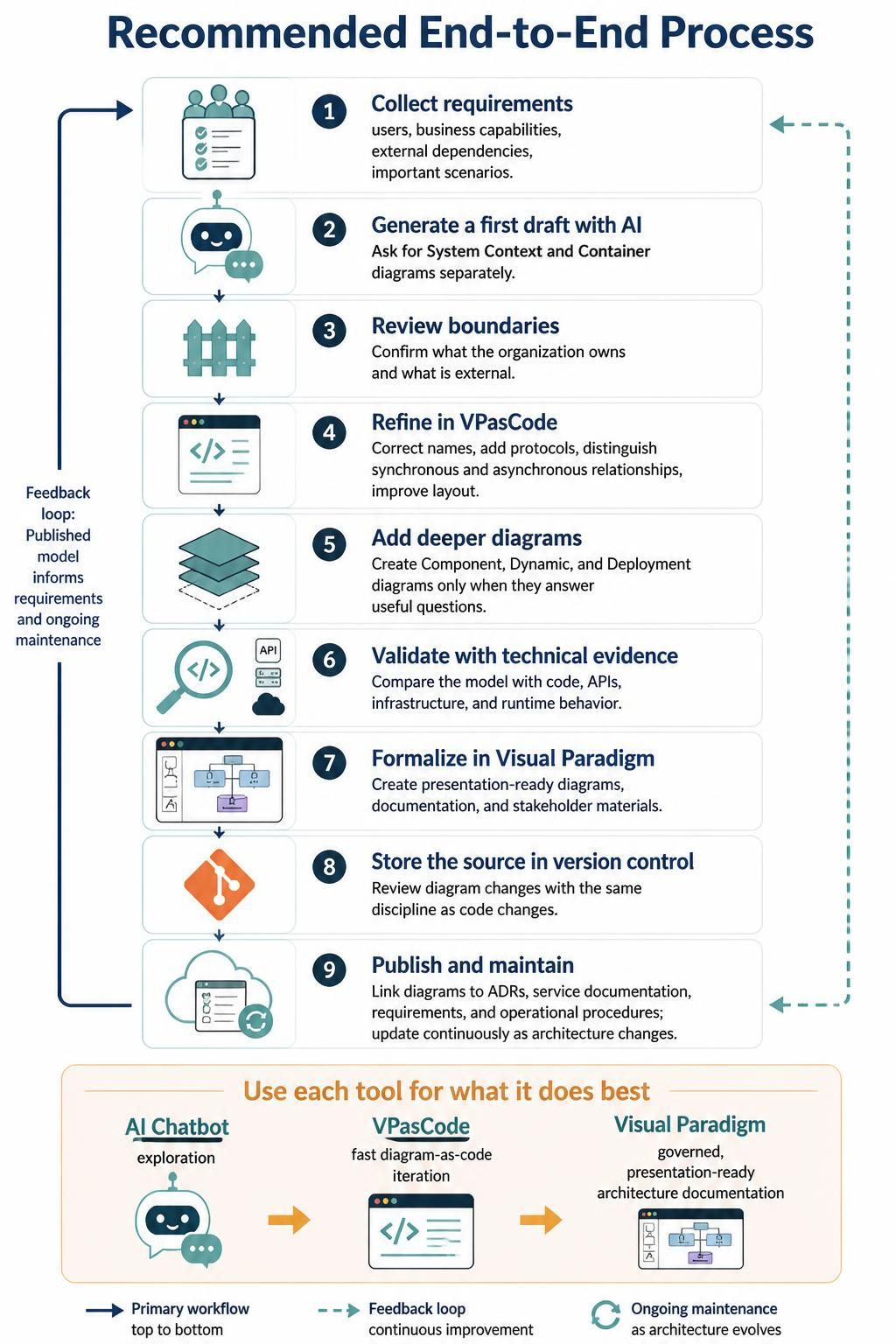
Modern software architecture is no longer a solitary activity of drawing boxes on a whiteboard. It is a dynamic, iterative process that requires a blend of human creativity, AI-powered exploration, and rigorous code-based maintenance. Based on the industry’s most effective end-to-end process, this tutorial guides you through a streamlined workflow that leverages Visual Paradigm, AI Chatbots, and VPasCode to create living architecture documentation.
The goal is to stop treating diagrams as static, once-a-year exercises. Instead, we will adopt a methodology where architecture is treated as code, continuously validated against reality, and maintained in sync with your evolving infrastructure.
Phase 1: Exploration and Definition (Steps 1-3)
The journey begins not with a tool, but with requirements. Before drawing a single line, you must define the boundaries of your system.
Step 1: Collect Requirements
Start by identifying the actors (users), business capabilities, external dependencies, and important scenarios. This phase is about understanding the “What” and “Who” before the “How.”
Step 2: Generate a First Draft with AI
Once requirements are clear, leverage the speed of AI. Ask an AI Chatbot to generate a first draft of your architecture. The prompt should be specific:
- Ask for a System Context Diagram: To define high-level boundaries.
- Ask for a Container Diagram: To define the major building blocks (e.g., Web App, Database, API).
Note: Do not try to generate deep technical diagrams (like Component or Dynamic) in the first AI pass. Keep the scope manageable.
Step 3: Review Boundaries
AI is a great starting point, but it lacks organizational context. Review the generated diagrams to confirm what your organization actually owns versus what is an external dependency (e.g., a third-party SaaS provider). This is the critical moment to define the perimeter of your system.
Phase 2: Refinement and Code (Step 4)
Once the high-level draft is approved, move to VPasCode. This is the “fast diagram-as-code” iteration phase where you refine the architecture into a precise, technical representation.
Why VPasCode?
VPasCode allows you to define your architecture using text. This provides three major benefits over drag-and-drop tools:
- Version Control Friendly: Architecture is stored as text files (similar to code), making it easy to track changes and revert errors.
- Consistency: Syntax rules enforce correct naming and relationships.
- Speed: Modifying relationships is as easy as changing a string of text.
Refining the Diagram
In this phase, you will take the rough AI draft and polish it using VPasCode syntax. You will:
- Correct Names: Ensure technical accuracy.
- Add Protocols: Explicitly define communication methods (e.g., HTTP, gRPC, AMQP).
- Distinguish Synchronous vs. Asynchronous: Visually differentiate between blocking calls (request/response) and fire-and-forget messaging.
- Improve Layout: Use layout directives to organize the diagram logically.
Example: VPasCode Snippet
Here is an example of how you might refine a container relationship in VPasCode to distinguish between a synchronous API call and an asynchronous event:
Container("WebApp", "React SPA", "JavaScript", "Serves the user interface")
Container("API", "Node.js API", "Node.js", "Core business logic")
ContainerDb("Database", "PostgreSQL", "SQL Database", "Stores user data")

ContainerDb("Database" -[x] "API")
Container("WebApp" -[x] "API")
Container("WebApp" -[> "API", "HTTP/REST", "Synchronous")
Container("API" -[>>] "Database", "TCP/IP", "Synchronous")
Phase 3: Deep Diving and Validation (Steps 5-6)
Not every system needs a component diagram. The rule of thumb is simple: Create deeper diagrams only when they answer a useful question.
Step 5: Add Deeper Diagrams
Once the Container model is stable, identify areas of complexity. If you are unsure how a specific microservice handles internal logic, create a Component Diagram. If you need to explain a sequence of events, a Dynamic Diagram is appropriate. Keep these focused and minimal.
Step 6: Validate with Technical Evidence
This is the most critical step for maintaining trust in your documentation. Do not let your diagrams drift away from reality. Compare your model against:
- Code: Do the class names match the implementation?
- APIs: Do the endpoints defined in the diagram exist in the Swagger/OpenAPI spec?
- Infrastructure: Are the servers and cloud services in the diagram actually deployed?
- Runtime Behavior: Does the traffic flow match the diagram?
Phase 4: Formalization and Maintenance (Steps 7-9)
The final steps involve polishing the output for stakeholders and ensuring the documentation survives the lifecycle of the software.
Step 7: Formalize in Visual Paradigm
While VPasCode is great for editing, Visual Paradigm is the ultimate tool for “governed, presentation-ready” documentation. Import your VPasCode models into Visual Paradigm to generate high-quality diagrams for:
- Architecture Decision Records (ADRs).
- Stakeholder presentations.
- Service documentation.
Step 8: Store the Source in Version Control
Just as you review code changes in Git, you must review diagram changes. Store your VPasCode source files in version control. This allows you to:
- Trace who changed the architecture and why.
- Revert accidental changes.
- Run automated checks on architecture syntax.
Step 9: Publish and Maintain Continuously
Finally, link your diagrams to your operational procedures. Update the diagrams when the architecture changes, not during a scheduled “documentation week.” By treating architecture as code and integrating it into your CI/CD pipeline, you ensure that your documentation is always up-to-date.
Conclusion: The Best of All Worlds
The most effective approach is not to choose between tools, but to use each for what it does best. By combining the exploratory power of AI Chatbots, the speed of VPasCode for iteration, and the governance of Visual Paradigm for documentation, you create a robust, living architecture model.
This workflow transforms architecture from a bureaucratic overhead into a central, valuable asset for your engineering team.