
Mastering Architecture with VP Unified Platform: Diagram-as-Code for Unified Systems
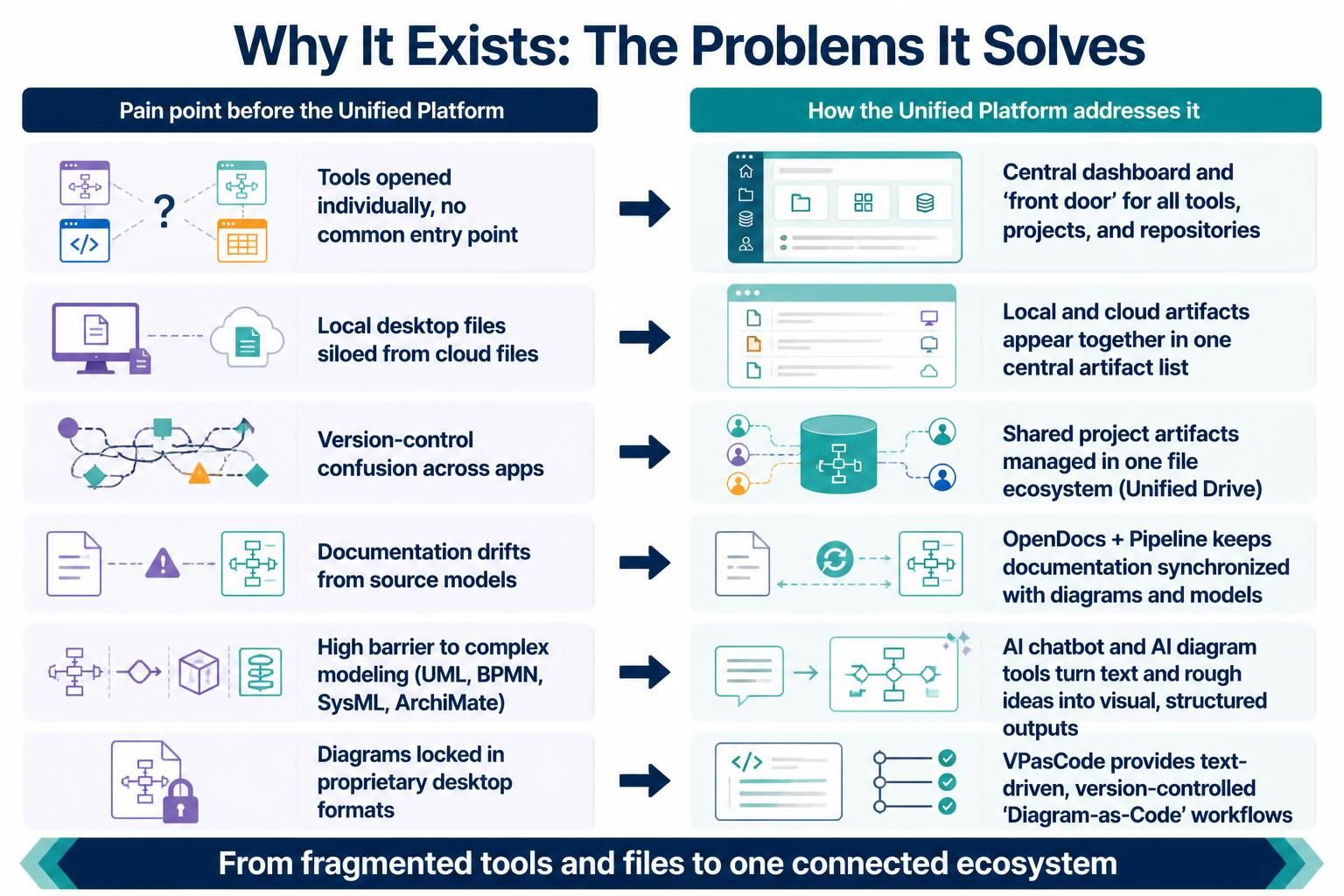
Modern software engineering and system design often suffer from “tool fragmentation.” Teams frequently rely on a chaotic mix of local desktop applications, disconnected cloud repositories, and proprietary formats that trap valuable architectural knowledge. The Unified Platform and Visual Paradigm’s VPasCode represent a paradigm shift, moving from these isolated islands to a cohesive, text-driven ecosystem.
In this tutorial, we will explore how the Unified Platform solves critical pain points like siloed data and documentation drift. We will then demonstrate how to leverage VPasCode to manage complex system architectures using “Diagram-as-Code” workflows, ensuring your visual models remain synchronized with your source code and version control systems.
The Architecture of the Unified Platform
The core philosophy behind the Unified Platform is to eliminate the friction between local development and cloud-based collaboration. Before this system, engineers faced several distinct challenges that slowed down the design and implementation cycle.
1. Centralization and the ‘Front Door’
In the past, opening a modeling tool required navigating a cluttered desktop with no common entry point. The Unified Platform addresses this by providing a Central Dashboard. This acts as the “front door” for the entire ecosystem, granting a unified view of all tools, active projects, and repositories. Instead of hunting for files, users access artifacts through a single, intuitive interface.
2. Unifying Local and Cloud Artifacts
A major historical pain point was the siloing of local desktop files from cloud storage. This led to version conflicts and lost work. The Unified Platform bridges this gap by displaying local and cloud artifacts together in one central list. This ensures that whether a file is being edited locally or accessed via the cloud, it appears in the same context.
3. The Unified Drive and Version Control
Version control confusion is rampant when different apps use different versioning systems. The Unified Platform solves this by managing shared project artifacts within a Unified Drive. This creates a single file ecosystem where version control is standardized, allowing teams to collaborate on shared models without the risk of “version drift” or conflicting file locks.
Modernizing Modeling: From Proprietary Lock-in to VPasCode
One of the most significant advancements in this ecosystem is the move away from proprietary desktop formats. Historically, diagrams were locked in closed formats that were difficult to integrate into CI/CD pipelines. VPasCode introduces a text-driven approach.
VPasCode allows architects to define complex diagrams using text, similar to how developers write code. This enables:
- Version Control: Diagrams are treated as text files, allowing for diffing, branching, and merging just like source code.
- Automation: Diagrams can be generated, updated, and reviewed automatically within build pipelines.
- AI Integration: The platform leverages AI chatbots to turn rough text ideas into visual, structured outputs (UML, BPMN, SysML, ArchiMate), lowering the barrier to entry for complex modeling.
Practical Tutorial: Building a System Architecture with VPasCode
To understand how this works in practice, let’s walk through creating a “System Architecture” diagram using VPasCode. Unlike traditional drag-and-drop tools, you define the structure using code. This ensures that your documentation never drifts from your source models.
Step 1: Define the Components
Start by defining the external entities and internal services. In VPasCode, you use simple syntax to declare nodes and their relationships.
@startuml
title Unified Platform Architecture
skinparam componentStyle rectangle

' Define External Actors
Actor "Developer" as Dev
Actor "Customer" as Cus

' Define Internal Systems
package "Unified Platform" {
    component "Central Dashboard" as Dash
    component "Unified Drive" as Drive
    component "AI Modeler" as AI
}

' Define Cloud Services
component "OpenDocs" as Docs
component "Pipeline" as Pipe
@enduml
Step 2: Establish Relationships and Data Flow
Next, connect your components to show how data flows from the local environment to the cloud. The text-driven approach allows you to explicitly define the “front door” entry point and the synchronization pipelines.
' Define Relationships
Dev --> Dash : "Access Front Door"
Cus --> Dash : "Submit Request"

Dash --> Drive : "Manage Artifacts"
Dash --> AI : "Generate Models"

' Synchronization Logic
Drive <--> Docs : "Synchronized via Pipeline"
Drive <--> Pipe : "Version Controlled"

' Styling for clarity
link Dash
link Drive
link Docs
Step 3: Leveraging AI for Rapid Prototyping
One of the standout features of the Unified Platform is its ability to generate these diagrams from text prompts. Instead of manually coding every node, you can use the AI chatbot to describe your system architecture, and the tool will generate the VPasCode syntax automatically. This drastically reduces the time spent on formatting and layout, allowing engineers to focus on the logic and relationships within their system.
Conclusion
The transition from fragmented desktop tools to the Unified Platform represents a maturity in system design engineering. By adopting VPasCode and the centralized ecosystem, teams can ensure their documentation is always synchronized, their version control is consistent, and their diagrams are accessible, version-controlled, and integrated with their development workflows.