
Mastering the VPasCode Workflow: From Natural Language to Version-Controlled Architecture Diagrams
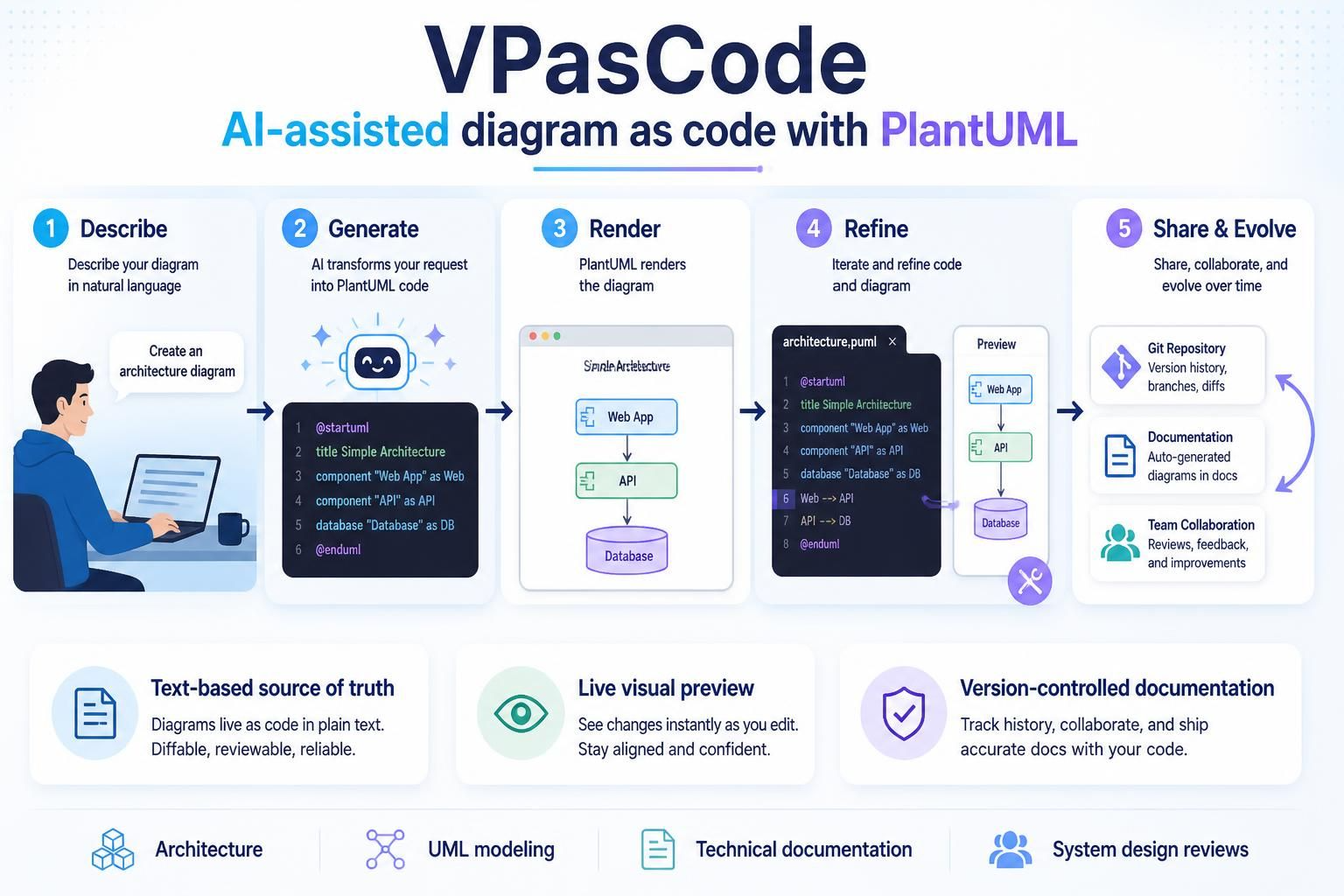
In modern software development, the gap between abstract design and technical implementation is often bridged by diagrams. However, traditional drag-and-drop tools often lead to “diagram rot”—visual artifacts that are hard to edit, difficult to version control, and quickly become outdated. Enter VPasCode, a browser-based workspace that revolutionizes this process by treating diagrams as code.
This tutorial explores the unique architecture of VPasCode, demonstrating how it combines the flexibility of text editors with the visual power of PlantUML and the speed of AI assistance. We will walk through the five-step workflow designed to create robust, maintainable system documentation.
The Core Workflow: 5 Steps to Architectural Clarity
VPasCode streamlines diagram creation by shifting the focus from drawing shapes to defining relationships. This “Diagram-as-Code” approach ensures that your documentation remains synchronized with your actual codebase.
Step 1: Describe
The process begins with human intent. Instead of wrestling with a canvas, you describe your architectural needs in natural language. Whether you are documenting a new microservice or mapping out a legacy monolith, you simply define the scope.
- Input: “Create an architecture diagram for a web application with an API and a database.”
- Benefit: Lowers the barrier to entry, allowing non-designers to produce professional diagrams.
Step 2: Generate (AI Transformation)
This is where VPasCode’s AI-assisted engine takes the wheel. The AI parses your natural language description and translates it into structured PlantUML code. This eliminates the need to memorize complex syntax rules for the initial draft.
@startuml
title Simple Architecture
component "Web App" as Web
component "API" as API
database "Database" as DB
Web --> API
API --> DB
@enduml
Step 3: Render
Once the code is generated, the PlantUML renderer instantly visualizes the text into a graphical component diagram. You don’t have to wait for a build process; the rendering happens in real-time as you type or as the AI generates the code.
Step 4: Refine
While AI provides a great starting point, professional architecture requires precision. In this step, you iterate directly on the source text. You can fine-tune labels, change component types (e.g., from a generic component to a specific database), or adjust styling. Because the diagram is text-based, you can edit it with the same efficiency as source code.
Step 5: Share & Evolve
The final stage integrates diagram creation into the software development lifecycle (SDLC). VPasCode treats your diagrams as a text-based source of truth.
- Version Control: Diagrams are stored in Git repositories, allowing you to track changes over time.
- Collaboration: You can use Git branches and diffs to review architectural changes alongside code changes.
- Documentation: Auto-generate diagrams directly into technical documentation.
Technical Pillars: Visual Paradigm + AI + PlantUML
The power of VPasCode lies in the synergy of three core pillars. Understanding how these interact is key to mastering the tool.
1. Visual Paradigm
Visual Paradigm provides the underlying engine and industry-standard compliance. It ensures that the diagrams generated adhere to UML (Unified Modeling Language) standards, making them recognizable to architects and developers across the industry.
2. AI-Assisted Generation & Modification
The AI layer acts as a bridge between human thought and machine syntax. It handles the heavy lifting of translating “natural language” to “formal code.” This reduces the cognitive load on the engineer, allowing them to focus on the architecture rather than the syntax.
3. The PlantUML Standard
PlantUML is the universal language of text-based diagrams. By leveraging this standard, VPasCode ensures portability. Your diagrams are not locked into a proprietary binary format; they are plain text files that can be read by any text editor and rendered by any PlantUML-compatible tool.
Conclusion
By adopting the VPasCode workflow, teams can ensure their documentation evolves alongside their source code. Whether you are performing system design reviews, creating UML models, or updating technical documentation, the “Describe, Generate, Render, Refine, Share” loop provides a structured, efficient path to clarity.