
Build Editable C4 Diagrams with AI Chatbot, VPasCode & VP Online
Architectural modeling often involves a trade-off between speed and control. Traditional diagramming tools offer high control but require time-consuming manual drawing, while AI generators offer speed but often produce “static” images that are difficult to modify later. Visual Paradigm bridges this gap with a unique workflow that combines the speed of AI with the flexibility of “Diagram-as-Code” (PlantUML) and the ease of a visual editor.
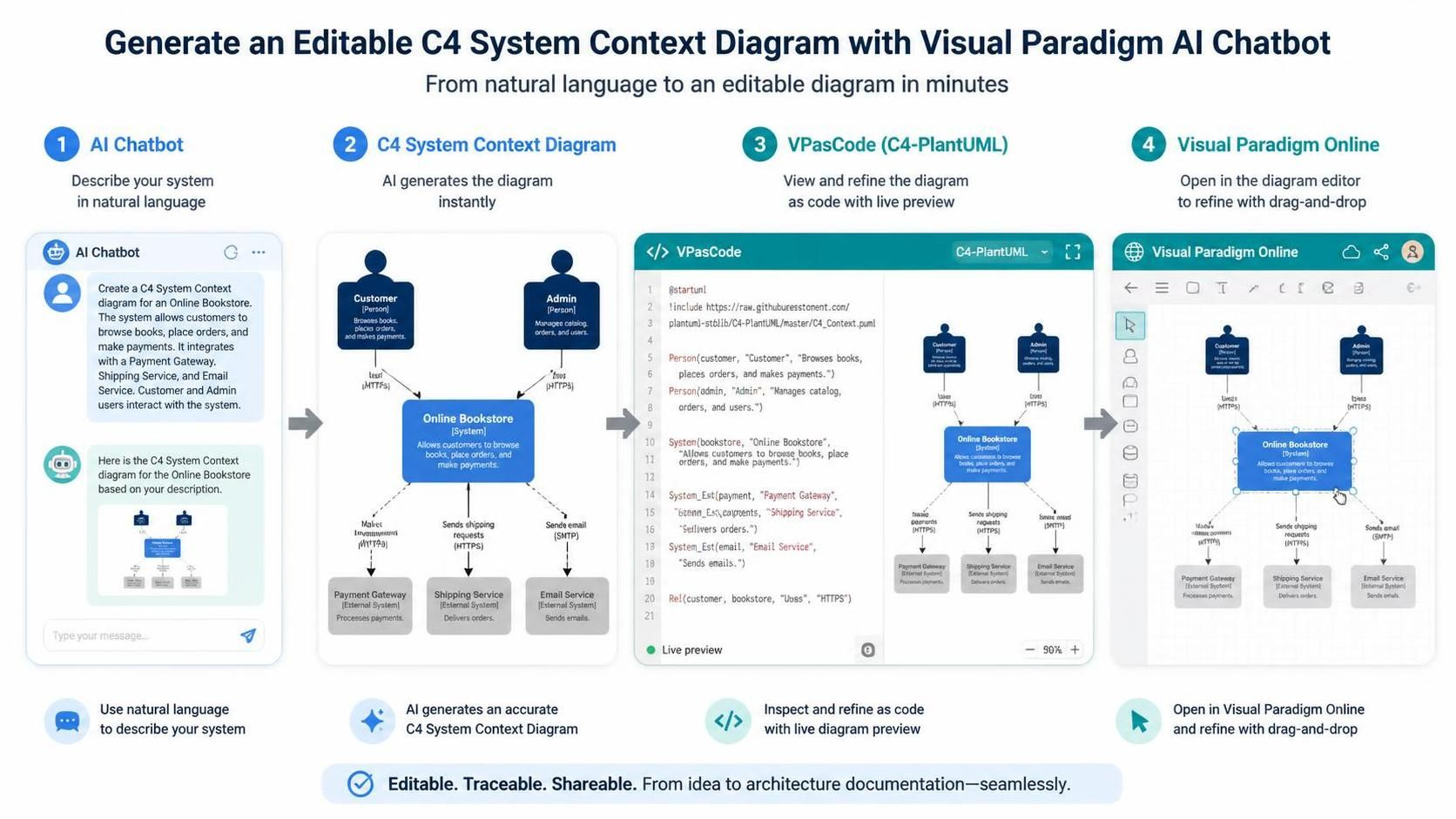
This tutorial demonstrates a seamless end-to-end workflow using the Visual Paradigm AI Chatbot, VPasCode, and the Web Diagram Editor. We will build a C4 System Context Diagram for an Online Bookstore, transforming a plain-language description into a fully editable, maintainable architecture model.
Phase 1: The AI Chatbot Interface
The process begins in the Visual Paradigm AI Chatbot. This tool acts as your initial modeling assistant. Instead of manually placing shapes on a canvas, you simply describe your system’s boundaries, actors, and external dependencies in natural language.
For this example, we define an “Online Bookstore” system. The AI analyzes the prompt to identify the core system, the primary actors (Customer, Admin), and the external services required for operation (Payment Gateway, Shipping Service, Email Service).
Input Prompt Example:
Create a C4 System Context diagram for an Online Bookstore. The system allows customers to browse books, place orders, and make payments. It integrates with a Payment Gateway, Shipping Service, and Email Service. Customer and Admin users interact with the system.
Phase 2: Instant Diagram Generation
Once the AI processes the description, it generates a C4 System Context Diagram. This diagram visualizes the “big picture” of your software system. It shows the system in the center, surrounded by the people who use it (Actors) and the external systems it communicates with.
Key Modeling Concepts in this Diagram:
- System (Blue Box): The central application (e.g., “Online Bookstore”).
- Person (Black Icon): The human actors, such as the Customer and Admin.
- External System (Grey Box): Third-party services that provide functionality, such as the Payment Gateway or Shipping Service.
- Relationships (Arrows): Lines connecting these elements with labels indicating the data flow or protocol (e.g., “Uses HTTPS”, “Sends email (SMTP)”).
Phase 3: Refinement with VPasCode (Diagram-as-Code)
While the generated image is accurate, it is a static rendering. To make the diagram truly editable and maintainable, we move to the next step: VPasCode. This tool converts the visual diagram into C4-PlantUML code.
Why is this important? By having the diagram as code, you gain version control capabilities (like Git) and the ability to programmatically update the model. In the VPasCode interface, you can inspect the code structure and refine it before the diagram is rendered again.
Generated C4-PlantUML Code:
@startuml
!include https://raw.githubusercontent.com/plantuml-stdlib/C4-PlantUML/master/C4_Context.puml

Person(customer, "Customer", "Browses books, places orders, and makes payments.")
Person(admin, "Admin", "Manages catalog, orders, and users.")

System(bookstore, "Online Bookstore", "Allows customers to browse books, place orders, and make payments.")

System_Ext(payment, "Payment Gateway", "Sells orders.")
System_Ext(shipping, "Shipping Service", "Delivers orders.")
System_Ext(email, "Email Service", "Sends emails.")

Rel(customer, bookstore, "Uses", "HTTPS")
Rel(customer, bookstore, "Makes payment", "HTTPS")
Rel(customer, bookstore, "Sends shipping requests", "HTTPS")
Rel(customer, bookstore, "Sends email", "HTTPS")

Rel(bookstore, payment, "Sells orders")
Rel(bookstore, shipping, "Delivers orders")
Rel(bookstore, email, "Sends emails")

@enduml
In this code block, you can see how the visual elements are defined textually. If you want to add a new actor or change a label, you can simply edit the text string in the code and see the diagram update instantly in the preview pane.
Phase 4: Final Polish in Visual Paradigm Online
The final step brings the power of code back into the visual editor. The diagram can be opened in the Visual Paradigm Online Web Diagram Editor. Here, the diagram is fully editable using a drag-and-drop interface.
This hybrid approach ensures that your architecture documentation is not just a picture, but a living model. You can refine the layout, change colors, or adjust connection lines visually, while knowing that the underlying code remains a valid reference for your team.
Summary of the Workflow
- Describe: Use the AI Chatbot to describe the system in plain English.
- Generate: Let AI instantly render the C4 Context Diagram.
- Refine: Use VPasCode to view and edit the model as C4-PlantUML code.
- Finalize: Open in Visual Paradigm Online for visual adjustments and final presentation.
By following this workflow, you achieve an architecture documentation process that is fast, traceable, and fully editable.