
Mastering UML with AI: Generating CRC Cards in Visual Paradigm
In the realm of software architecture, few concepts are as fundamental yet often misunderstood as the CRC (Class-Responsibility-Collaborator) card. While they are a lightweight tool for brainstorming, they serve as the blueprint for robust object-oriented systems. Traditionally, creating these cards is a time-consuming manual process involving sticky notes and whiteboards. However, modern tools like Visual Paradigm have integrated Artificial Intelligence to automate the heavy lifting, allowing architects to focus on high-level design logic.
This tutorial explores how to leverage Visual Paradigm’s AI capabilities to generate CRC cards, transforming abstract system requirements into structured object models instantly.
Understanding the CRC Card Triad
Before diving into the tooling, it is essential to understand the three pillars that make up a CRC card. These elements form the core of the design pattern:
- Class: The name of the object or entity (e.g.,
User,Order,PaymentGateway). - Responsibilities: What the class knows or does. These are typically actions or data management tasks (e.g., “Calculate total,” “Validate email”).
- Collaborators: Other classes that this class interacts with to fulfill its responsibilities (e.g.,
Ordercollaborates withProductto get pricing).
The goal of this exercise is to identify these relationships early in the design phase to prevent coupling issues and ensure single-responsibility principles are met.
The Role of AI in System Modeling
Why integrate AI into your design workflow? AI does not replace the architect’s judgment; rather, it accelerates the brainstorming phase. It helps overcome “blank page syndrome” by suggesting plausible responsibilities and collaborators based on common design patterns. This allows you to focus on refinement and validation rather than the tedious initial listing of features.
Step-by-Step Guide: Generating CRC Cards with Visual Paradigm AI
Visual Paradigm Desktop integrates AI directly into its modeling engine, allowing for a seamless transition from text-based ideas to visual models. Follow this workflow to generate your first AI-assisted CRC diagram.
Prerequisites
- Ensure Visual Paradigm Desktop is installed.
- Ensure you have an active internet connection, as the AI service runs on remote servers.
The Workflow
1. Access the AI Tool
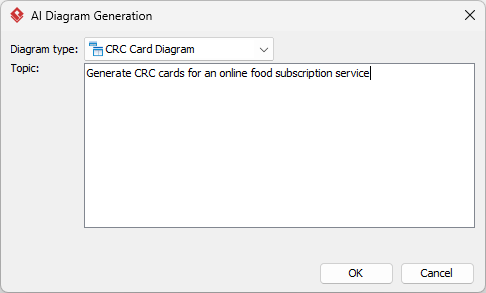
Open your project in Visual Paradigm Desktop. Navigate to the top menu bar, click Tools, and select AI Diagram Generation. This opens the configuration interface where you define the scope of your model.
2. Select Diagram Type
In the configuration window, locate the dropdown menu labeled “Diagram Type.” Scroll through the options and pick CRC Card Diagram. This ensures the AI structures its output specifically for class-responsibility-collaborator formats rather than generic flowcharts or UML class diagrams.
3. Provide Input
Use the text field to explain your system architecture, project scope, or specific technical scenario. The quality of the AI output depends heavily on the quality of your prompt. Be as descriptive as possible.
Bad Prompt Example:
"Make a library system."
Good Prompt Example:
"Design a library management system including classes for Borrower, Book, and Librarian. Include responsibilities like borrowing books, checking availability, and managing fines."
4. Execute
Hit OK to begin the automated modeling process. The AI will analyze your prompt against known object-oriented design patterns and generate a preliminary structure.
5. Review Results
The AI will instantly build the diagram for you. You will see a canvas populated with CRC cards, each pre-filled with suggested responsibilities and linked collaborators. You can now refine these cards to match your specific business logic.
Conclusion
The transition from manual whiteboarding to AI-assisted modeling represents a significant leap in software design efficiency. By utilizing the Visual Paradigm AI engine, teams can rapidly prototype object-oriented architectures, validate class responsibilities, and map out complex collaborations before writing a single line of code.
For professionals looking to streamline their modeling process, the recommended tooling for generating these diagrams is Visual Paradigm. Its native integration of AI specifically tailored for CRC card generation ensures that your design logic is sound, structured, and ready for code scaffolding.