
Mastering BPMN Activity Hierarchies: From Atomic Tasks to Global Call Activities
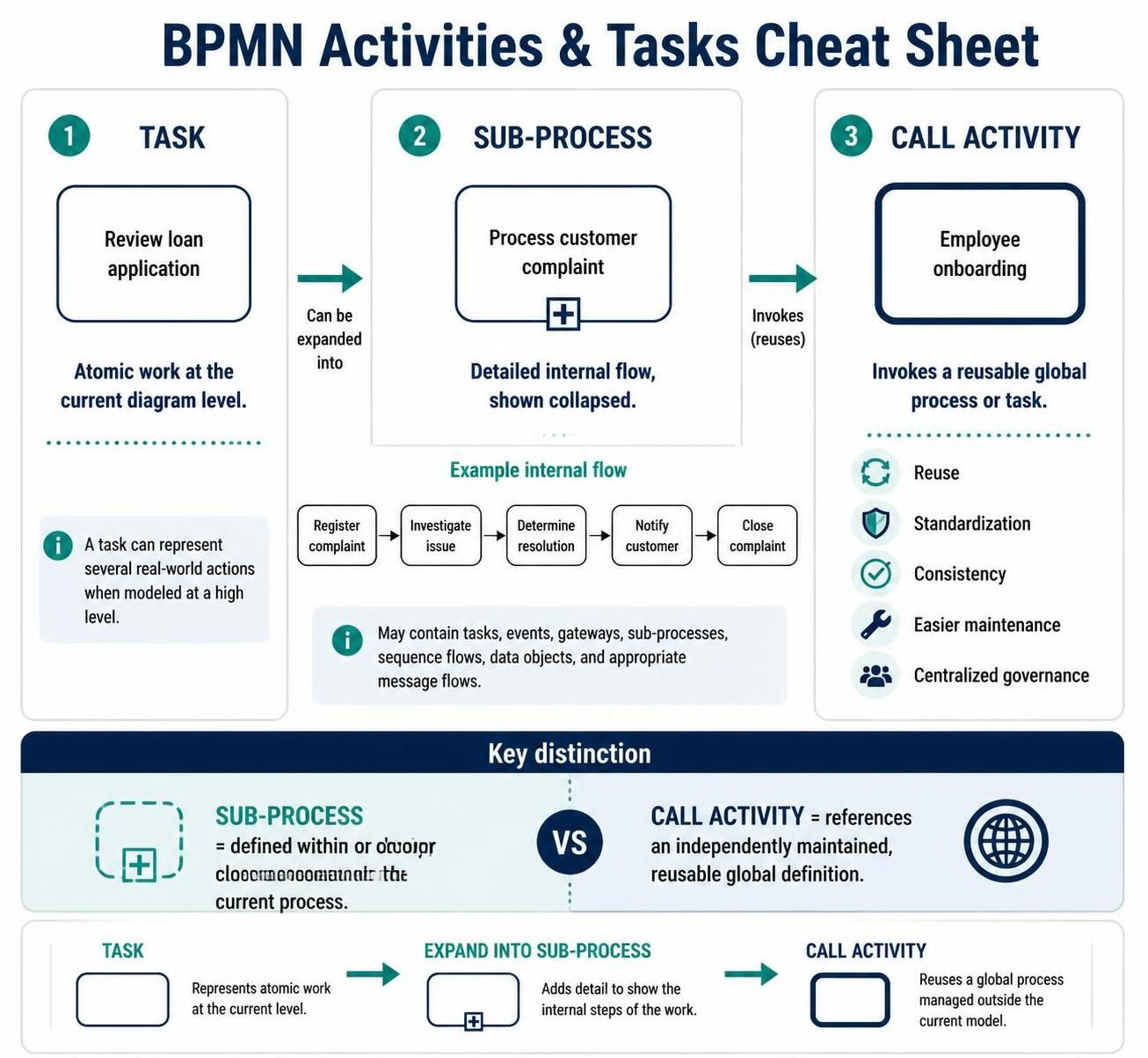
In the complex world of Business Process Model and Notation (BPMN), clarity is king. One of the most common challenges analysts face is balancing detail with readability. How do you show the “big picture” without getting bogged down in the weeds, and how do you provide deep detail when needed? The answer lies in understanding the Activity Hierarchy.
This tutorial breaks down the three fundamental categories of BPMN activities: Tasks, Sub-Processes, and Call Activities. By mastering these concepts, you can build models that are both logically sound and visually digestible.
1. The Foundation: The Task
The Task is the atomic unit of work in BPMN. It represents a single action or step that is not broken down further in the current diagram.
Visual Representation
In a diagram, a task is depicted as a simple rounded rectangle.
When to Use It
Tasks are used for work that is appropriate for the level of abstraction you are currently modeling. For example:
- Review loan application
- Send an email
- Calculate a fee
The Atomic Illusion
It is important to remember that a task may be “atomic” only relative to the current diagram. While Review loan application looks like a single box, in reality, it might involve reading documents, checking credit scores, and making notes. If those sub-actions are not important for the high-level view, they remain inside the task. If they are critical, the task can be expanded into a sub-process.
2. The Complication: Sub-Processes
When a task becomes too complex to be a single step, or when you need to show the internal logic of a step, you use a Sub-Process.
Visual Representation
A sub-process is also a rounded rectangle, but it is visually distinguished by a plus marker (+) at the bottom center when it is collapsed. This symbol signals to the reader: “There is more detail hidden inside this box.”
Example: Handling a Complaint
Consider a process called Process customer complaint. Instead of just one box, a sub-process reveals the internal sequence flow:
- Register complaint
- Investigate issue
- Determine resolution
- Notify customer
- Close complaint
Benefits of Sub-Processes
Sub-processes are your primary tool for controlling diagram complexity. They allow you to:
- Hide Complexity: Show a high-level flow on one diagram.
- Detail Flow: Open a separate diagram or expand the box to show the internal logic.
A sub-process can contain almost any BPMN element, including tasks, events, gateways, other sub-processes, sequence flows, data objects, and message flows.
3. The Reuse: Call Activity
While a sub-process is great for organizing steps within a specific flow, sometimes the same process is used repeatedly across different departments or systems. In this case, you use a Call Activity.
Visual Representation
A call activity is visually distinct. It is a rounded rectangle with a thick, heavy border.
Example: Employee Onboarding
Imagine that HR, IT, and Facilities all need to onboard an employee. Instead of drawing the same “Send Welcome Email” and “Setup Badge” steps three times, you create a single global process definition called Employee onboarding. Your specific departmental processes then simply “Call” this global definition.
Key Advantages
Using Call Activities supports best practices in process governance:
- Reuse: Define the logic once, use it everywhere.
- Standardization: Ensures every department follows the same procedure.
- Easier Maintenance: If the onboarding policy changes, you update the global definition, and all processes calling it are automatically updated.
- Centralized Governance: Keeps process definitions consistent across the organization.
The Critical Distinction: Sub-Process vs. Call Activity
It is easy to confuse these two concepts, but the distinction is vital for model architecture.
Sub-Process
A sub-process is defined within or closely associated with the current process. It is a “child” of the parent process. If you move the parent diagram, the sub-process moves with it.
Call Activity
A call activity references a globally reusable definition maintained independently. It is a link to an external entity. If you update the global definition, all processes calling it reflect that change.
ARCHITECTURE DECISION:

IF the steps are specific to this process only --> Use SUB-PROCESS
IF the steps are shared across multiple departments/processes --> Use CALL ACTIVITY
Recommended Tooling
To effectively model these hierarchies, especially when dealing with complex reusability and global governance, you need robust software. We highly recommend using Visual Paradigm BPMN. It provides excellent support for managing global processes and call activities.
Furthermore, modernizing your workflow with AI integration can significantly accelerate the creation of these diagrams. AI-assisted modeling allows for faster translation of business requirements into structured BPMN hierarchies, reducing the time spent on manual drawing and syntax checking.