
Mastering Process Data Modeling: A Guide to BPMN Objects, Stores, and Best Practices
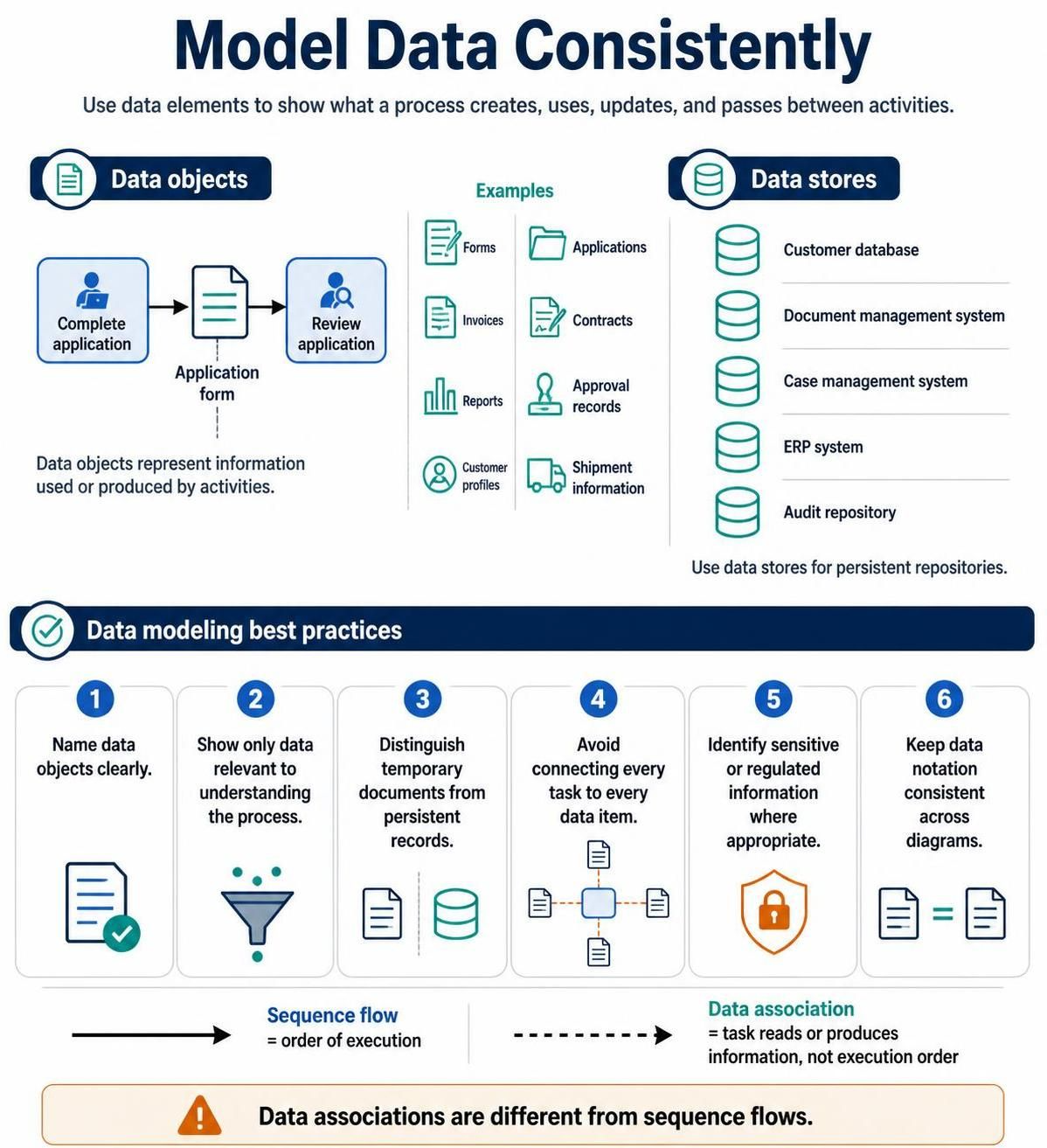
In the world of Business Process Model and Notation (BPMN), the flow of information is just as critical as the flow of tasks. A process model that defines “what happens” but fails to specify “what information is used” is incomplete. This tutorial explores the critical concept of modeling data consistently, distinguishing between temporary data objects and persistent data stores, and adhering to best practices for clarity and accuracy.
1. Understanding Data Objects
At the heart of process modeling are data objects. These elements represent specific pieces of information that are created, used, updated, or passed between activities. They give context to the process by explaining why a process exists and what each activity produces.
Data objects are typically represented by a document-like icon (often with a folded corner). They are best used for transient information that flows through the process lifecycle.
Common Examples of Data Objects
- Forms: Application forms, request forms, or data entry sheets.
- Contracts: Signed agreements or legal documents.
- Invoices: Billing documents generated during a transaction.
- Reports: Analytics, summaries, or status updates.
- Approval Records: Logs indicating who authorized a step.
- Customer Profiles: Specific data snapshots regarding a client.
- Shipment Information: Logistics data like tracking numbers or delivery addresses.
Example Scenario
Consider a standard application workflow. The process flow might look like this:
- Complete Application: A user fills out a form.
- Data Object (Application Form): This specific document is created and passed along.
- Review Application: A manager reads the form to make a decision.
In this scenario, the “Application Form” is a data object. It physically moves (conceptually) from the “Complete” task to the “Review” task.
2. Distinguishing Data Stores
While data objects represent specific instances of information, data stores represent the persistent repositories where that information is saved for long-term retention. A data store is analogous to a database, a file cabinet, or a document management system.
Use data stores when a process interacts with a system that holds information permanently. Common examples include:
- Customer Databases
- Document Management Systems
- Case Management Systems
- ERP Systems
- Audit Repositories
The Difference
It is crucial to distinguish between temporary documents (Data Objects) and persistent records (Data Stores). A data object represents a single transaction or instance, whereas a data store represents the container that holds thousands of such instances.
3. Data Modeling Best Practices
To ensure your diagrams are readable and effective, follow these six fundamental best practices:
- Name Data Objects Clearly: Avoid generic labels like “Data” or “Info.” Use specific names like “Invoice #1024” or “Signed Contract.”
- Show Only Relevant Data: Do not clutter the diagram. Show only the data that is necessary to understand the process logic. If a piece of data isn’t used to make a decision or drive an activity, omit it.
- Distinguish Temporary from Persistent: Use the correct notation. Ensure that temporary documents are modeled as data objects (documents) and not data stores (cylinders).
- Avoid Over-Connection: Do not connect every single task to every single data item. This creates a “spaghetti diagram” that is impossible to read. Only connect tasks to the specific data they create or consume.
- Identify Sensitive Information: Where appropriate, mark data that is regulated (e.g., PII, financial data) to ensure security requirements are met.
- Keep Notation Consistent: Ensure that if you use a specific icon style for data objects in one diagram, you use the same style across all diagrams in the project.
4. The Critical Distinction: Sequence Flows vs. Data Associations
A common point of confusion for beginners is the relationship between tasks and data. It is vital to remember that data associations are different from sequence flows.
- Sequence Flow: Represents the order of execution. It dictates that Task B happens after Task A.
- Data Association: Represents a read or write relationship. It indicates that a task produces or consumes information. It does not dictate the order of execution.
For example, a task might “Read” a customer profile from a database (Data Association), but that does not mean the process pauses until the database is accessed; it simply means the information is required for the task.
Conclusion
Mastering the modeling of data is essential for creating robust, actionable process maps. By correctly utilizing data objects for transient information and data stores for persistent repositories, you provide stakeholders with a clear understanding of the information lifecycle within your organization. Adhering to best practices ensures that your diagrams remain clean, readable, and technically accurate.
To implement these concepts effectively and leverage the full power of BPMN 2.0 standards, the Recommended tooling of Visual Paradigm BPMN Tool is highly advised. Visual Paradigm offers comprehensive support for these data modeling elements, allowing users to easily manage associations, maintain consistent notation, and generate high-quality documentation.