
Accelerate Documentation with Visual Paradigm Unified Platform & VP OpenDocs
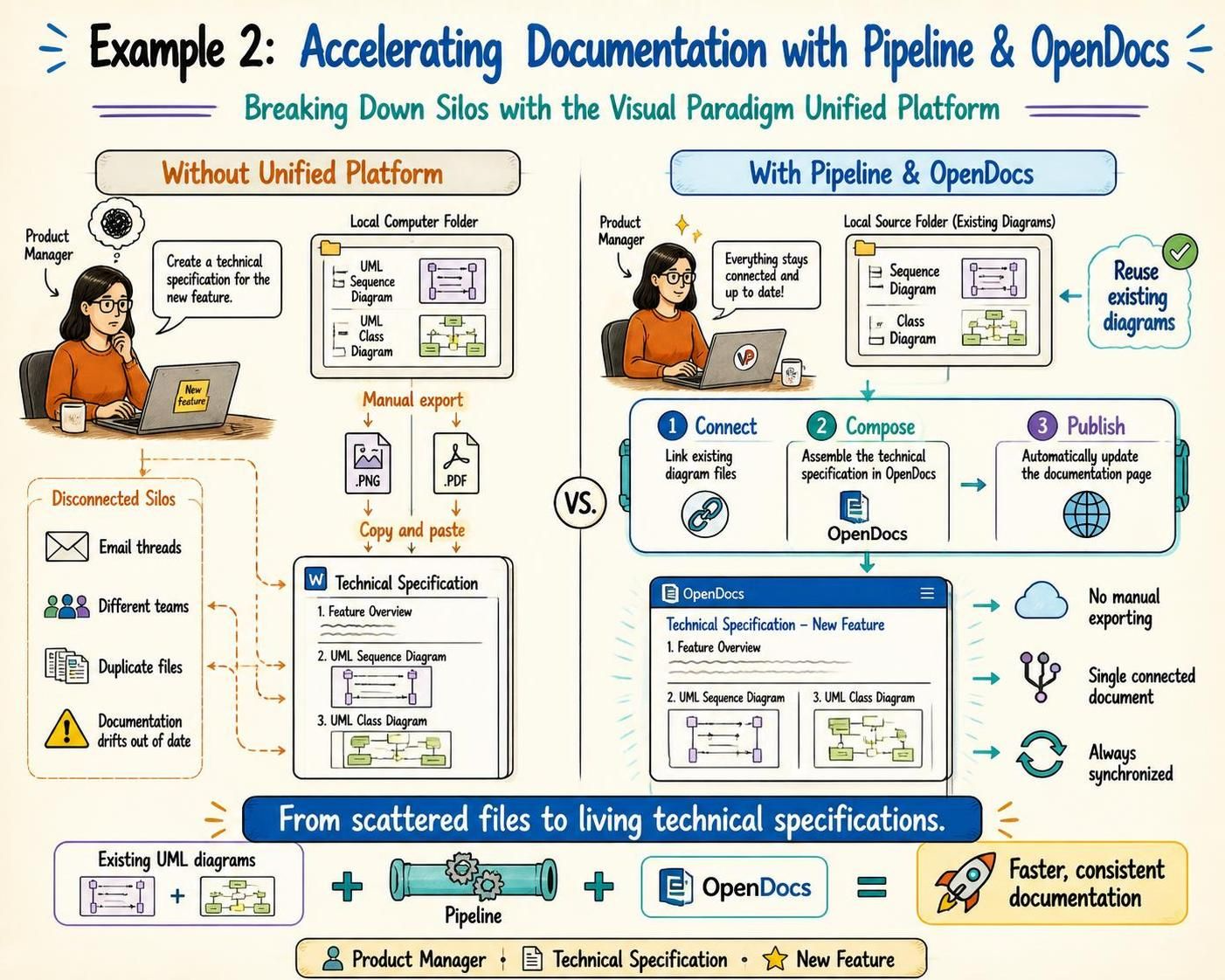
In the modern software development lifecycle, the gap between modeling and documentation is often filled with inefficiencies. Product Managers and Technical Leads frequently find themselves managing “disconnected silos,” where diagrams exist in one place and specifications in another. This tutorial explores a transformative approach to this challenge, demonstrating how to leverage the Visual Paradigm Unified Platform to automate documentation workflows.
Using the scenario of a Product Manager creating a technical specification for a new feature, we will deconstruct the architecture of this solution, contrasting the traditional “manual export” method with the modern Pipeline & OpenDocs workflow.
The Problem: Disconnected Silos and Manual Workflows
Traditionally, the creation of a technical specification is a fragmented process. Imagine a Product Manager needing to document a “New Feature.” They have existing UML Sequence Diagrams and Class Diagrams stored locally on their computer. Without a unified system, the workflow typically looks like this:
- Isolation: The diagrams are trapped in a local computer folder, disconnected from the writing environment.
- Manual Export: The user must manually export these diagrams as image files (.PNG) or static documents (.PDF).
- Copy and Paste: The user then copies these static files into a Word document or text editor.
This method creates “Disconnected Silos.” It leads to duplicate files, reliance on email threads for updates, and a critical risk: Documentation drifts out of date. If a developer changes the class structure later, the Word document becomes obsolete unless someone remembers to manually update the image.
The Solution: The Unified Platform Architecture
The Visual Paradigm Unified Platform introduces a paradigm shift by treating documentation as a “living” entity. Instead of static images, the system connects your source models directly to your documentation pages. This is achieved through a streamlined three-step process: Connect, Compose, and Publish.
Step 1: Connect (Linking the Source)
The foundation of this architecture is the ability to link existing diagram files without duplication. Instead of exporting, the system establishes a dynamic link to the “Local Source Folder.”
- Existing UML Diagrams: The system reads the Sequence Diagram and Class Diagram directly.
- Integrity Check: The system verifies that everything stays connected and up-to-date, ensuring that the source of truth is the model file, not a screenshot.
Step 2: Compose (Assembling with OpenDocs)
This is where the magic happens. The platform utilizes a tool called OpenDocs (part of the Visual Paradigm suite). OpenDocs acts as a robust authoring environment that allows you to assemble the technical specification.
When you “Compose,” you are not pasting images. You are inserting references. The architecture works as follows:
- You start the document with a Feature Overview.
- You insert the UML Sequence Diagram. Because it is linked, it renders dynamically.
- You insert the UML Class Diagram.
This creates a single, connected document that aggregates your technical assets seamlessly.
Step 3: Publish (Automatic Synchronization)
The final stage ensures that the documentation remains accurate. With the “Publish” function, the system automatically updates the documentation page.
- No Manual Exporting: There is no need to re-save images and re-upload them.
- Always Synchronized: If the underlying UML Class Diagram is modified, the next time the document is published, the change is reflected instantly.
Key Takeaways: From Scattered Files to Living Specifications
The transition from a manual workflow to the Pipeline & OpenDocs architecture offers significant advantages:
- Faster Documentation: By eliminating the manual export and copy-paste steps, the time-to-market for technical specs is drastically reduced.
- Consistency: The system ensures that what you see in the document is exactly what exists in the model.
- Collaboration: By breaking down silos, teams can work on a single connected document rather than wrestling with duplicate files.
Ultimately, this approach transforms technical documentation from a static, error-prone chore into a dynamic, automated asset. It bridges the gap between the Product Manager’s vision and the technical reality, ensuring that the documentation evolves right alongside the software.